Every photographer wants better performance from their camera — faster autofocus, cleaner images, better colours, smoother stability. While many think upgrading gear is the only solution, there is one free and extremely powerful upgrade often ignored:
Updating Your Camera Firmware.
Camera manufacturers frequently release firmware updates that significantly enhance your camera’s performance. For wildlife, action, portrait, or travel photography, keeping your firmware updated can dramatically improve your results.
Let’s understand why firmware updates are so important and how you can update your camera safely.
What Is Camera Firmware?
Firmware is the internal software that controls your camera’s entire system. It manages vital functions such as:
- Autofocus speed and accuracy
- Image processing
- Colour science
- Exposure metering
- Lens communication
- Video performance
- Menu operations
- Stabilisation
In simple words:
Firmware is the operating system of your camera. Just like your phone and laptop receive software updates, your camera also needs firmware updates to stay fast, stable, and compatible with new features.
Why Updating Camera Firmware Is So Important
Updating your firmware is one of the easiest ways to unlock the full potential of your camera. Here are the biggest benefits:
1. Sharper and Faster Autofocus
Firmware updates often bring major improvements in AF performance:
- Better animal & bird eye detection
- Faster tracking
- Improved subject recognition
- More responsive low-light focusing
For wildlife photographers, this increases sharp, usable images dramatically.
2. Improved Image Quality
New firmware versions can refine:
- Colour accuracy
- Noise reduction
- Dynamic range
- Processing algorithms
Your images come out cleaner, sharper, and more natural.
3. Compatibility With New Lenses and Accessories
New lenses require updated communication. Firmware ensures:
- Accurate autofocus
- Correct stabilisation
- Fast data communication
Without updates, your expensive lens may not perform properly.
4. Bug Fixes and Enhanced Stability
Firmware updates fix issues like:
- Freezing
- Lag
- Random shutdowns
- Memory card errors
- Battery drain
Your camera becomes more reliable during critical moments.
5. Added New Features
Many brands now add completely new features through firmware:
- Improved Eye AF
- Bird/animal detection
- New video codecs
- Extra shooting modes
- Faster burst speeds
- Better stabilisation
This means your camera gets better without spending money.
How to Update Your Camera Firmware (Step-by-Step Guide)
Although each camera brand has a slightly different process, the steps are generally similar for Sony, Canon, Nikon, Fujifilm, Panasonic, and others.
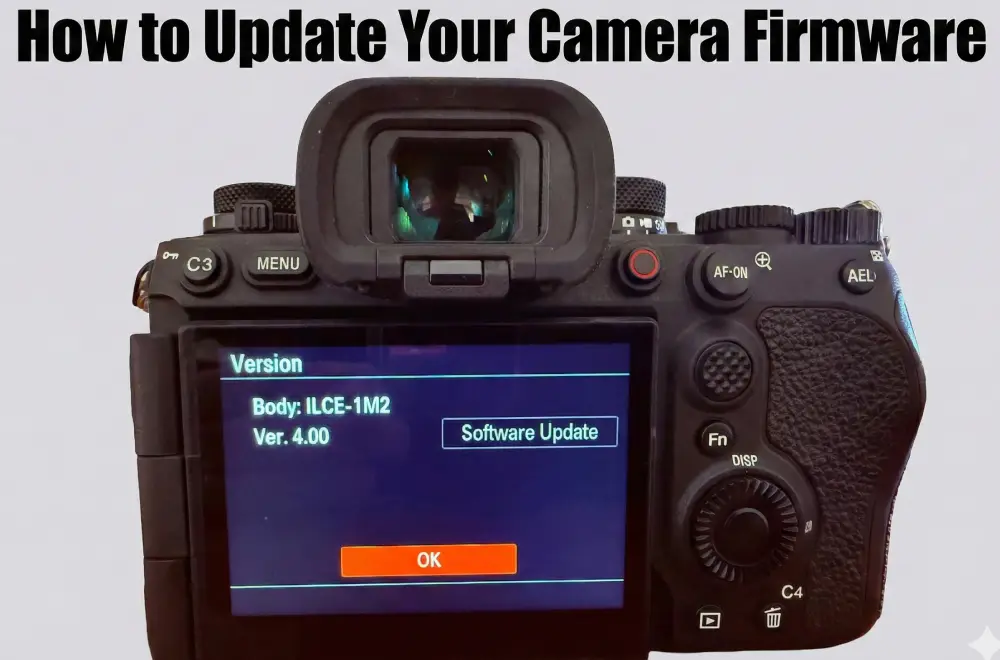
Step 1: Check Your Current Firmware Version
Go to:
Menu → Setup → Firmware / Version
Note both:
- Body firmware
- Lens firmware (if available)
Step 2: Download the Latest Firmware
Go to the official support website of your brand:
- Sony Support
- Canon Support
- Nikon Download Center
- Fujifilm Support
- Panasonic Support
Download the latest firmware version for your camera body and lenses.
Step 3: Prepare Your Camera
- Fully charge your battery (100% recommended)
- Format a clean memory card
- Remove accessories (flash, grip, etc.)
- Do NOT turn off the camera during the update
This step is critical for safety.
Step 4: Install the Firmware
Method A – Memory Card Update
- Copy the downloaded firmware file to the empty memory card
- Insert card into camera
- Open Firmware Update in the menu
- Follow on-screen instructions
Method B – Computer Utility
- Connect camera to computer
- Open the official firmware updater tool
- Follow the installation steps
The update usually takes 2–10 minutes.
Step 5: Restart and Verify
After installation:
- Restart the camera
- Go back to “Firmware Version”
- Confirm the latest numbers are displayed
Your camera is now updated.
How Often Should You Update Camera Firmware?
- Check every 2–3 months
- Always update after purchasing a new lens
- Update before major photo tours (but not last minute)
- Follow manufacturer announcements
Regular updates keep your camera performing at its best.
Conclusion
Updating your camera firmware is one of the simplest and most effective ways to improve overall performance — without buying new gear. Firmware updates give you:
- Sharper autofocus
- Better image quality
- More stability
- New features
- Lens compatibility
A well-updated camera performs faster, smoother, and more reliably — which is essential for wildlife, action, and professional photography.

Yogesh Bhatia is a professional Wildlife photographer & mentor in India whose work reflects patience, observation, and a deep respect for nature. His journey in wildlife photography is shaped by countless hours in forests, observing animal behavior and waiting for moments that unfold naturally. Through his lens, wildlife is portrayed not just as subjects, but as living stories within their natural environment. His approach to Wildlife photography India focuses on authenticity rather than staged perfection, resulting in images that feel raw and immersive.